Certified webflow experts

Marketers, time to migrate your website without getting a migraine

Migrate to Webflow without the stressing about the SEO dips, CMS breakdowns, or business blockage.

Clients who've migrated their website with us

Migration can feel like a stressful process.

We make migrating to webflow effortless.

We've done this enough times to know what breaks and how to stop it before it happens.

What clients say about us

We really appreciate the degree to which the whole team has been open to feedback and revisions, has been willing to work with us on really making the thing pixel perfect.
Conrad Cheung
Artist, Conrad Cheung
We really like the process for sure — you seem very process-oriented. I just wish you had been there five years ago! Yeah, I mean, Webflow is pretty famous, right? But in my experience, handing over a website can be tricky.
Geetanjali Chitnis
Chief Brand Officer, Geist
We had a great experience. What stood out the most was the energy and problem-solving spirit of the team. Obviously, we’re going to do more work now. Now that we’re happily stuck here, I might trouble them a little more.
Koushiic Durai
Founder and CEO, WowFactories
It's very rare to find people like you guys. When you find the right set of people, you should just go with it and do it.
Joveena Abreo
Leading marketer, Stellaris Venture Partners
You managed all of the requests from our end, so that was a good experience. We felt that you understood the brief well. We were sort of thinking about which option to go for, and that's a really good place to be when you have two really good options.
Sunaina Makhija
Client Engagement Director, Alkemiz
We enjoyed working with you folks, and the output truly exceeds our expectations :) We will definitely look to work with you again in the near future.
sharan client testimonial profile image
Richa Pande
Head of Communications

Our insights on website migration

Wordpress to Webflow migration

Wordpress to Webflow Migration

Learn why WordPress to Webflow migration is trending, how to overcome migration challenges, and uncover Webflow's standout features for effortless website design.

By 
Saurabh Chakradhari
5 min read

About Wordpress

WordPress has long been a dominant force in the realm of website creation and content management systems (CMS). Its user-friendly interface, vast plugin ecosystem, and robust community support have made it a go-to choice for individuals and businesses alike. However, as the digital landscape evolves, so do the needs and expectations of website owners. But like any other tool Wordpress now has its limitations and gets complicated with compatibility issues across vast plugins used in websites.

Enter Webflow - a powerful, all-in-one web design platform that offers a modern approach to building and managing websites. In this blog post, we'll explore why many are considering migrating from WordPress to Webflow, the challenges associated with this transition, and how to successfully make the move.

About Webflow

Webflow revolutionizes web design by combining user-friendly tools with powerful features, simplifying the website building process for beginners and offering advanced capabilities for experienced designers. With its intuitive visual editor, customizable templates, and support for Flexbox and CSS Grid, Webflow enables precise control over layout design. Additionally, its interactions and animations add dynamic elements to engage audiences, while CMS and e-commerce functionalities streamline content management and online selling. With reliable hosting and built-in SEO features, Webflow ensures a seamless experience, empowering designers and businesses to create professional, responsive websites effortlessly.

Why Migrate WordPress to Webflow

Design Flexibility:

Webflow provides unparalleled design flexibility, allowing users to create custom layouts and animations without writing a single line of code. This level of control is often limited in WordPress without advanced coding skills or the use of premium themes. In case you need something on the custom front you have flexibility to add custom code.

Speed and Performance:

Webflow's optimized hosting infrastructure ensures lightning-fast loading times and superior performance compared to many WordPress setups, especially those bogged down by numerous plugins updates or clashing of plugins and bulky themes. 

Responsive Design:

With mobile devices accounting for a significant portion of web traffic, it's essential to have a responsive website. Webflow simplifies the process of creating mobile-friendly designs, ensuring a seamless experience across all devices.

Integrated Ecosystem:

Unlike WordPress, where users often rely on third-party plugins for additional functionality, Webflow offers an integrated ecosystem that streamlines the design, development, and maintenance process.

Simplified Maintenance:

Webflow's intuitive interface and visual editor make it easy to update content, make design tweaks, and manage website assets without the need for technical expertise.

Common Challenges with WordPress to Webflow Migration

Content Migration:

Transferring content from WordPress to Webflow can be a complex process, especially for websites with large volumes of pages, posts, and media files. Careful planning and the use of migration tools are essential to ensure a smooth transition.

SEO Preservation:

Maintaining search engine rankings and preserving SEO elements such as meta tags, redirects, and structured data markup is crucial during the migration process. Failure to do so can result in a loss of organic traffic and visibility.

Functionality Replication:

WordPress sites often rely on plugins to add functionality such as e-commerce, membership portals, and contact forms. Replicating these features in Webflow may require custom coding or the use of third-party integrations.

Learning Curve:

While Webflow offers a user-friendly interface, transitioning from WordPress to a new platform inevitably involves a learning curve. Training and familiarization with Webflow's features and workflows are necessary for a successful migration. Webflow has its own free courses to explain the entire webflow process and how to maintain your website easily.

How to Migrate WordPress to Webflow

Design and Development:

For migration you can actually decide to have the website revamped from scratch and made in Webflow or replicate your WordPress site's design in Webflow, taking advantage of the platform's visual editor and design tools to create a responsive, visually stunning website.

Content Inventory:

Begin by conducting a thorough inventory of your WordPress website's content, including pages, posts, images, and multimedia files.

Choose a CMS Migration Method:

Depending on the complexity of your site, you can opt for manual migration, use Webflow's built-in CMS importer, or enlist the help of third-party migration services.

SEO Considerations:

Prioritize the preservation of SEO elements such as URLs, meta tags, and redirects. Use Webflow's SEO settings to optimize your site's on-page elements for search engines.

Testing and Optimization:

Thoroughly test your migrated website across different devices and browsers to ensure compatibility and functionality. Fine-tune design elements, optimize performance, and address any issues that arise.

Launch and Monitoring:

Once satisfied with the migration, launch your Webflow website and monitor its performance closely. Monitor traffic, engagement metrics, and user feedback to identify areas for improvement and optimization.

Conclusion

While migrating from WordPress to Webflow presents its challenges, the benefits of improved design flexibility, performance, and ease of maintenance make it a compelling choice for many website owners. By following best practices and careful planning, you can successfully transition your website to Webflow and unlock new possibilities for your online presence. If you want help on migration or just want to get your website build in webflow contact us on - jerry@everything.design

READ BLOG
arrow
Wix to webflow migration

Wix to Webflow Migration

Learn why you need to migrate your Wix website to Webflow, how to overcome migration challenges, and uncover Webflow's standout features for effortless website design.

By 
Saurabh Chakradhari
5 min read

About Wix

Wix has been around since 2006, and it's become a go-to choice for many looking to create beautiful websites without breaking a sweat. Its drag-and-drop interface, loads of templates, and powerful features have made it a favourite among users, whether they're starting a personal blog or launching an online store.

About Webflow

Webflow is changing the game in web design, making it easier than ever for beginners and offering advanced capabilities for seasoned designers. Its user-friendly tools combined with powerful features streamline the website building process.

The intuitive visual editor, customizable templates, and support for Flexbox and CSS Grid give designers precise control over layout design. With Webflow, you can create stunning websites with ease.

But it doesn't stop there. Webflow's interactions and animations add dynamic elements that captivate audiences, while its CMS and e-commerce functionalities make content management and online selling a breeze.

And let's not forget about hosting and SEO – Webflow has you covered with reliable hosting and built-in SEO features. Say goodbye to technical headaches and hello to professional, responsive websites effortlessly created with Webflow.

Why Migrate Wix to Webflow

But as your website grows, you might find yourself bumping into Wix's limitations. That's where Webflow steps in. It offers a more flexible and robust environment for designing and developing websites. With Webflow, you're not stuck with templates or plugins – you have full control over your site's look and functionality, thanks to access to the underlying code.

While Wix is great for many things, it does have its drawbacks. For instance, it lacks some basic features like text span, and there are other CSS and HTML features missing that might hold back your website's development. This can be a major reason to consider migrating to Webflow, where you have more options at your fingertips.

Common Challenges with Wix to Webflow Migration

Despite the benefits of migrating from Wix to Webflow, the transition process may present certain challenges that users should be aware of:

Content Migration:

Transferring text, images, and multimedia from Wix to Webflow needs careful planning to ensure everything lands where it should.

Design Adaptation:

Replicating your Wix design in Webflow might require some tweaking to get it just right.

SEO Preservation:

Keeping your SEO intact during the move is crucial. You'll need to handle redirects, metadata, and sitemap updates carefully.

Functionality Integration:

Integrating existing functionalities, such as forms, galleries, and dynamic content, into the Webflow environment may necessitate custom development or third-party solutions to ensure seamless operation.

Training and Familiarization:

As Webflow operates on a different paradigm than Wix, users and stakeholders may require training and familiarization with the new platform to leverage its full potential effectively.

How to Migrate Wix to Webflow

While migrating from Wix to Webflow may seem daunting, following a structured approach can streamline the process and mitigate potential challenges:

Assessment and Planning:

Evaluate your existing Wix website to identify key components, functionalities, and content that need to be migrated. Develop a comprehensive migration plan outlining timelines, resources, and milestones.

Content Export and Preparation:

Export and organize your content including images and multimedia files, to fit into Webflow's requirements.

Design and Layout Migration:

Rebuild your Wix design in Webflow or start fresh with a new look. Pay attention to responsive design principles to ensure compatibility across devices.

Functionality Implementation:

Rebuild existing functionalities or integrate new ones using Webflow's built-in features, custom code, or third-party integrations. Test and refine functionality to ensure smooth operation and user experience.

SEO Optimization:

Don't forget about SEO - Transfer metadata, including page titles, descriptions, and URLs, to Webflow and set up proper redirects to preserve SEO equity. Submit updated sitemaps to search engines and monitor rankings post-migration.

Testing and Quality Assurance:

Test your new site thoroughly and get your team up to speed on using Webflow effectively.

Training and Onboarding:

Provide training and documentation to users and stakeholders on using the Webflow platform effectively.

Conclusion

While switching from Wix to Webflow might seem like a big step, the benefits of a more flexible platform can outweigh the challenges. With careful planning and execution, you can make the move smoothly and unlock new possibilities for your website.
READ BLOG
arrow
Weebly to Webflow Migration

Weebly to Webflow Website Migration

Want an expert for your Weebly to Webflow website migration you have came to right place, let's us help you get a scalable website for your enterprise.

By 
Jiyash AK
5 min read

About Weebly

Weebly is a popular website builder that allows users to create and manage websites with ease. It offers a drag-and-drop interface, making it accessible for individuals and small businesses without extensive technical knowledge. Launched in 2006, Weebly has grown to support millions of users worldwide, providing a range of templates, e-commerce capabilities, and integrations to help users build professional-looking websites quickly and efficiently.

Use Cases of Weebly

  • Personal Blogs: Easy to set up and manage. Offers customizable templates for personal expression.
  • Small Business Websites: Affordable and straightforward for small businesses. Built-in e-commerce features for selling products online.
  • Portfolio Sites: Ideal for freelancers and creatives to showcase their work. Simple drag-and-drop functionality for adding multimedia content.
  • Nonprofit and Community Sites: Cost-effective solution for nonprofits. Tools for creating events, collecting donations, and engaging with the community.
  • Educational Websites: Used by teachers and students to create educational content. Supports multimedia content and interactive features.

Disadvantages of Weebly

  • Limited Customization: Restricted design flexibility compared to more advanced platforms. Templates can be limiting for unique branding needs.
  • Scalability Issues: Not ideal for large businesses or websites with complex needs. Limited in handling high traffic volumes or extensive databases.
  • SEO Limitations: Weebly provides essential SEO features such as the ability to set page titles, meta descriptions, and alt text for images. While these features are sufficient for basic SEO, they may not be enough for more competitive markets where advanced optimization techniques are required to rank well in search engine results.
  • Dependency on Weebly Ecosystem: Limited third-party integrations. Reliance on Weebly’s tools and plugins can be restrictive.
  • Performance Issues: Occasional speed and performance issues reported by users. Less control over hosting environments compared to platforms like Webflow.

About Webflow

Webflow is a more advanced website builder that combines the ease of a visual editor with the power of a full-fledged CMS (Content Management System). Launched in 2013, Webflow caters to designers, developers, and businesses looking for more design freedom and advanced capabilities. It offers robust features for responsive design, CMS, e-commerce, and SEO, making it a preferred choice for professionals seeking a high level of customization and control over their websites.

Comparison Between Weebly and Webflow

Design Flexibility:

Weebly:

Templates: Weebly offers a range of predefined templates that are easy to use and customize to a limited extent. This approach simplifies the design process but restricts creativity.

Customization: The customization options are basic, allowing users to modify colors, fonts, and layout elements within the constraints of the chosen template. This makes it difficult to create a truly unique website without significant limitations.

Webflow:

Visual Editor: Webflow provides a powerful visual editor that allows designers to create custom designs from scratch. This editor gives complete control over every aspect of the site's design, enabling the creation of unique and highly customized websites.

Flexibility: With the ability to use custom HTML, CSS, and JavaScript, Webflow offers unmatched design flexibility. Designers can implement complex animations, interactions, and dynamic content seamlessly.

Ease of Use:

Weebly:

User Interface: Weebly's interface is highly intuitive, designed to be user-friendly and accessible even for those with no technical background. The drag-and-drop builder simplifies the website creation process, making it ideal for beginners.

Learning Curve: The learning curve is minimal, allowing users to quickly build and publish websites without needing extensive training or prior experience.

Webflow:

Robust Platform: Webflow, while offering extensive design capabilities, has a steeper learning curve due to its advanced features. It is best suited for users with some experience in web design or development.

Complexity: The platform's complexity requires time and effort to master, but the resulting capabilities far exceed those of simpler tools. Webflow provides extensive tutorials, documentation, and community support to aid in the learning process.

SEO and Performance:

Weebly:

SEO Tools: Weebly provides basic SEO tools that allow users to perform fundamental optimizations, such as meta tags, alt text for images, and simple URL structures. However, the depth and flexibility of these tools are limited compared to more advanced platforms.

Performance: Some users have reported performance issues with Weebly sites, particularly as the site grows in complexity and content. This can affect load times and overall user experience.

Webflow:

Advanced SEO: Webflow offers advanced SEO capabilities, including customizable meta tags, clean and semantic HTML, and fine-tuned control over page structures. These features enable better search engine visibility and ranking potential.

Performance Optimization: Webflow is optimized for performance, ensuring fast load times and smooth user experiences. The platform's hosting infrastructure is robust, contributing to superior site speed and reliability.

Scalability:

Weebly:

Website Size: Weebly is well-suited for small to medium-sized websites, such as personal blogs, small business sites, and simple e-commerce stores. Its features and infrastructure are designed to handle these use cases effectively.

Limitations: As websites grow in size and complexity, Weebly's limitations become more apparent. The platform may struggle to support large-scale websites with extensive content and advanced functionality.

Webflow:

Scalability: Webflow is highly scalable, making it suitable for large websites and complex projects. It can handle high-traffic sites, large amounts of content, and intricate design requirements without compromising performance.

Flexibility: The platform's flexibility and advanced features allow for the creation of diverse web projects, from simple landing pages to complex web applications and large-scale e-commerce sites.

E-commerce Capabilities:

Weebly:

Basic Features: Weebly provides basic e-commerce features sufficient for small stores. These include product listings, simple inventory management, and basic payment processing options.

Limitations: For more complex e-commerce needs, such as advanced inventory management, custom checkout processes, and extensive product variations, Weebly's capabilities may fall short.

Webflow:

Advanced Functionality: Webflow offers advanced e-commerce functionalities with extensive customization options. Users can create custom product pages, integrate various payment gateways, and implement sophisticated inventory management systems.

Customization: The platform allows for the design of unique shopping experiences tailored to specific brand aesthetics and business requirements. This level of customization is beneficial for businesses looking to create a distinct online presence and improve customer experience.

Why Migrate Weebly to Webflow

1. Enhanced Design Capabilities

Complete Control Over Website Design:

  • Visual Editor: Webflow’s visual editor, often referred to as a “designer,” allows you to design websites without writing code. It provides a drag-and-drop interface with granular control over every element, making it possible to create pixel-perfect designs.
  • Custom Animations and Interactions: With Webflow, you can create custom animations and interactions using a visual interface. This enables the design of dynamic and engaging user experiences that are difficult to achieve with Weebly.
  • Responsive Design: Webflow offers built-in tools for responsive design, allowing you to create sites that look great on all devices. You can adjust layouts, styles, and content specifically for different screen sizes.
  • Design Freedom: Unlike Weebly, which can be restrictive in terms of design templates and customization, Webflow provides the flexibility to start from scratch or use a template and modify it extensively to match your brand’s vision.

2. Improved SEO Features

Advanced SEO Tools:

  • Metadata Control: Webflow gives you greater control over metadata, including title tags, meta descriptions, and alt text for images. This enhances your ability to optimize individual pages for search engines.
  • URL Structures: You can customize URL structures in Webflow to ensure they are SEO-friendly, which helps improve your site’s search engine ranking.
  • SEO Settings: Webflow allows you to set up 301 redirects, create custom XML sitemaps, and manage canonical tags, all of which are crucial for effective SEO.
  • Clean Code: Webflow generates clean, semantic HTML5 code, which is beneficial for SEO. This ensures search engines can easily crawl and index your site.

3. Better Performance and Speed

Optimized Infrastructure:

  • Faster Loading Times: Webflow hosts your site on a global Content Delivery Network (CDN), ensuring fast loading times regardless of where your visitors are located. Fast loading speeds are crucial for user experience and SEO.
  • Minified Code: Webflow automatically minifies your site’s code, reducing file sizes and improving load times.
  • Optimized Images: Webflow’s built-in image optimization tools ensure that images are compressed and served in the most efficient format, further enhancing site speed.
  • Efficient Hosting: Webflow’s hosting infrastructure is designed for high performance, providing better uptime and reliability compared to Weebly’s hosting services.

4. Greater Scalability

Robust Platform for Growth:

  • High Traffic Handling: Webflow’s hosting can handle high volumes of traffic without compromising performance, making it suitable for growing businesses.
  • Complex Content Management: Webflow’s CMS allows for sophisticated content management, enabling you to create complex structures and dynamic content without limitations.
  • Scalable Infrastructure: As your business grows, Webflow provides the scalability needed to accommodate new features, larger databases, and increased functionality without needing to migrate to a new platform.
  • API and Integrations: Webflow’s API and extensive integrations enable you to connect with other tools and services, enhancing your site’s functionality and scalability.

5. Advanced E-commerce Functionality

Sophisticated E-commerce Tools:

  • Customizable Shopping Experience: Webflow’s e-commerce platform allows for extensive customization of the shopping experience, from product pages to checkout processes. You can design unique, branded experiences that align with your business goals.
  • Streamlined Transactions: Webflow provides seamless integration with various payment gateways, simplifying the transaction process for customers and merchants.
  • Inventory Management: Webflow’s e-commerce tools include advanced inventory management features, making it easier to track stock levels and manage product variations.
  • Marketing and SEO Integration: Webflow’s e-commerce platform is designed with SEO and marketing in mind, offering tools to optimize product listings and create targeted marketing campaigns.

Common Challenges with Weebly to Webflow Migration

Data Transfer:

  • Ensuring all content, images, and files are correctly migrated.
  • Maintaining data integrity and structure during the transfer.

Design Re-implementation:

  • Recreating the existing design in Webflow’s environment.
  • Adapting design elements to fit Webflow’s capabilities.

SEO and URL Structure:

  • Preserving SEO rankings and ensuring proper redirections.
  • Managing changes in URL structures to avoid broken links.

Learning Curve:

  • Adapting to Webflow’s interface and advanced features.
  • Training team members to effectively use Webflow.

Time and Resource Investment:

  • Allocating sufficient time and resources for a smooth migration.
  • Managing potential downtime during the transition.

How to Migrate Weebly to Webflow

  • Prepare and Export Content: Export content from Weebly and create backups. Organize content for easy import into Webflow.
  • Set Up Webflow Account and Project: Create a new Webflow account and set up a project. Familiarize yourself with Webflow’s interface and features.
  • Recreate Design in Webflow: Use Webflow’s visual editor to rebuild the website design. Ensure responsiveness and consistency across devices.
  • Import Content and Media: Upload and organize content within Webflow’s CMS. Add  images, videos, and other media elements.
  • Implement SEO Settings and Redirects: Configure SEO settings and metadata in Webflow. Set up 301 redirects to preserve SEO rankings.
  • Test and Optimize: Thoroughly test the new website for functionality and performance. Optimize loading times and user experience.
  • Launch and Monitor: Launch the new Webflow website. Monitor performance and make necessary adjustments.

Conclusion

Migrating from Weebly to Webflow can be a strategic move for businesses and individuals seeking greater design flexibility, improved SEO capabilities, and better performance. While the migration process may present challenges, the benefits of using Webflow’s advanced tools and features make it a worthwhile investment. With careful planning and execution, transitioning from Weebly to Webflow can enhance your online presence and support the growth of your digital endeavours.

READ BLOG
arrow
Site123 to Webflow Migration

Site123 to Webflow Website Migration

Want an expert for your Site123 to Webflow website migration you have came to right place, let's us help you get a scalable website for your enterprise.

By 
Rajashri Brahma
5 min read

In the fast-paced digital landscape, having a stunning website is crucial for businesses to thrive. With platforms like Site123 and Webflow offering website building services, choosing the right one can make all the difference in your online presence. Let's explore why migrating from Site123 to Webflow could be the game-changer your website needs.

About Site123

Site123 is a user-friendly website builder that aims to simplify the web development process for individuals and small businesses. It offers a straightforward interface with pre-designed templates and drag-and-drop functionality, making it accessible even to those without technical expertise. Site123 focuses on providing a quick and easy solution for creating basic websites, blogs, and online stores.

Use cases of Site123

Site123 serves as a user-friendly solution for individuals and businesses seeking to establish an online presence quickly and easily. Here's a breakdown of the primary use cases for Site123:

  • Entrepreneurs and Startups: Site123 caters to entrepreneurs and startups looking to create a professional website without investing significant time or resources into development. Its intuitive interface and ready-made templates allow them to launch their online presence swiftly, enabling them to focus on growing their business.
  • Small Businesses and Local Services: Site123 is ideal for small businesses, such as local shops, cafes, and service providers, that require a basic yet functional website to showcase their offerings and attract customers. Its simplicity and affordability make it accessible to businesses with limited technical expertise or budget for web development.
  • Freelancers and Creative Professionals: Freelancers, including writers, designers, photographers, and consultants, can benefit from Site123's ease of use to showcase their portfolios, services, and expertise. With its drag-and-drop interface and pre-designed templates, freelancers can quickly create a professional-looking website to showcase their work and attract clients.
  • Events and Special Projects: Site123 is suitable for creating websites for events, such as conferences, workshops, weddings, and fundraisers. Its user-friendly interface and customizable templates allow event organizers to create informative and visually appealing websites to promote their events, share schedules, and facilitate registrations or ticket purchases.
  • Educational and Nonprofit Organizations: Educational institutions, students, and nonprofit organizations can leverage Site123 to create informative websites to share resources, promote initiatives, and engage with their audience. Its easy-to-use tools and affordable pricing make it accessible to organizations with limited budgets or technical expertise.

Disadvantages of Site123

Despite its simplicity and convenience, Site123 has some limitations that may not suit everyone's needs. Here are some limitations that users should consider:

  • Limited Customization Options:  One of the primary drawbacks of Site123 is its lack of extensive customization capabilities. Users may find themselves constrained by the predefined templates and limited flexibility in modifying design elements. This can result in websites that lack uniqueness and fail to fully reflect the brand identity or vision of the user.
  • Scalability Challenges: As businesses grow and evolve, website requirements often become more complex. Users may find themselves limited in terms of adding advanced features, scaling up their website's capabilities, or integrating with third-party services.
  • Limited SEO Capabilities: While Site123 includes basic SEO tools and features, it may not offer the same level of optimization and customization as other platforms. Users may need to invest additional time and effort into optimizing their websites for search engines to improve visibility and rankings.
  • Potential for Cookie-Cutter Websites: Due to its reliance on templates and predefined layouts, Site123 websites may lack uniqueness and originality, leading to a risk of blending in with competitors or appearing generic to visitors.
  • Absence of a Content Management System (CMS): Site123 lacks a robust content management system (CMS) that allows users to easily manage and update their website content. This can make ongoing maintenance and content updates more challenging, especially for users who frequently publish new content or need to make real-time changes to their websites.

About Webflow

Webflow is a powerful website builder and design tool that empowers users to create highly customizable and visually stunning websites without writing code. It combines the ease of use of a visual editor with the flexibility of a code-based platform, allowing designers and developers to bring their creative visions to life. Webflow offers advanced features such as custom animations, responsive layouts, and dynamic content, making it a favorite among professionals seeking complete control over their designs.

Comparison between Site123 and Webflow

When comparing Site123 and Webflow, the key differences lie in their target audiences and feature sets. Site123 excels in simplicity and accessibility, making it suitable for beginners and those with basic website needs. On the other hand, Webflow caters to design-savvy users who require more advanced customization options and control over their projects. While Site123 offers convenience and speed, Webflow provides flexibility and creativity.

Ease of Use:

  • Site123 has user-friendly interface and intuitive website building process. It caters to users with minimal technical expertise, offering a straightforward drag-and-drop editor and pre-designed templates that simplify the website creation process.
  • Webflow provides powerful design capabilities, it has a steeper learning curve compared to Site123. Its interface is more complex, targeting users with some level of design or development experience. However, Webflow offers extensive tutorials and resources to help users navigate its features.

Customization Options:

  • Site123 offers limited customization options compared to Webflow. While users can choose from a range of templates and customize basic elements such as colors and fonts, they may find themselves constrained by the platform's predefined layouts and design restrictions.
  • Webflow stands out for its unparalleled design flexibility and customization capabilities. Users have full control over every aspect of their website's design, from layout and animations to interactions and responsive breakpoints. With Webflow's visual editor and code-level control, the possibilities for customization are virtually limitless.

Content Management System (CMS):

  • Site123 lacks a built-in Content Management System (CMS), which means users have limited control over managing and updating their website content. Publishing new blog posts without a CMS may involve manual processes and repetitive tasks. Site owners may need to manually create and format each blog post within the website builder interface, leading to slower content publishing times and potential errors.
  • Webflow provides a robust CMS that empowers users to create and manage dynamic content-driven websites. From blog posts to product listings, Webflow's CMS offers flexibility in structuring content and simplifies the process of content creation and management. This feature is particularly advantageous for websites that frequently update content or require structured data organization.

Scalability:

  • Site123 may face scalability limitations as websites grow in complexity or require advanced features. Users may find themselves restricted in terms of adding custom functionality or integrating with third-party services beyond what Site123 offers out of the box. This can potentially hinder the expansion and evolution of websites, especially for businesses with evolving needs and requirements.
  • Webflow excels in scalability, catering to both small businesses and enterprise-level websites. Its robust design and development capabilities allow users to create highly scalable and customizable websites that can adapt to evolving business needs. Moreover, Webflow's support for custom code and integrations further enhances scalability by allowing users to extend the platform's functionality and integrate with external services as needed.

Why Migrate from Site123 to Webflow

Migrating from Site123 to Webflow can offer several benefits, particularly for users looking for more advanced design capabilities, customization options, and scalability. Here are some reasons why someone might choose to make the switch:

There are several reasons why users may choose to migrate from Site123 to Webflow:

  1. Greater Design Flexibility: Webflow provides users with unparalleled design flexibility, allowing for the creation of highly customized and visually stunning websites. Unlike Site123's limited customization options, Webflow offers granular control over every aspect of the design, from layout and typography to animations and interactions.
  2. Comprehensive CMS: Unlike Site123, which lacks a built-in Content Management System (CMS), Webflow offers a robust CMS that simplifies content creation, organization, and publishing. With Webflow's CMS, users can easily manage blog posts, product listings, and other dynamic content, making it ideal for content-heavy websites. This allows for more engaging and interactive website experiences compared to Site123's static content structure.
  3. Scalability and Growth:  As businesses expand and their needs evolve, Webflow provides the flexibility to adapt and scale accordingly. Whether it's adding new features, integrating with third-party services, or redesigning the website, Webflow offers the tools and resources to support business growth and development.
  4. Professionalism and Brand Identity: With Webflow, users have complete control over their website's branding and styling, allowing them to create a cohesive and professional online presence that aligns with their brand identity. This level of customization is essential for businesses looking to stand out and make a lasting impression on their audience.

Common Challenges with Site123 to Webflow Migration

While migrating from Site123 to Webflow offers numerous benefits, it also presents some challenges:

  1. Content Transfer: Transferring content from Site123 to Webflow can be labor-intensive and may require manual effort since Site123 and Webflow have different content structures or formatting conventions, making it challenging to directly export and import content without adjustments.
  2. Design Adaptation: Adapting the design from Site123 to Webflow may pose difficulties in maintaining consistency and coherence since Webflow's design approach and capabilities differ from Site123's, requiring adjustments to ensure that the migrated website retains its aesthetic appeal and usability.
  3. Learning Curve: Users accustomed to Site123's simplicity may face a learning curve when transitioning to Webflow since Webflow offers advanced features and a more complex interface compared to Site123, requiring users to invest time and effort in familiarizing themselves with its tools and workflows.
  4. SEO Considerations: Changes in URL structure during migration can impact SEO rankings and indexing.  Users might need to re-enter some SEO settings (meta tags, headings, alt text for images) in Webflow.

How to Migrate from Site123 to Webflow

Unfortunately, there isn't a direct one-click migration tool for moving from Site123 to Webflow.expand_more The process involves rebuilding your website in Webflow with the content and design elements from your Site123 site. However, there are steps you can follow to make it smoother:

  1. Plan and Organize:  Make a list of all your website pages, content sections, and functionalities. This will help you stay organized during the rebuild process.
  2. Design & Layout:  Use your Site123 website as a reference to recreate the layout and design in Webflow's visual editor. Webflow offers more flexibility than Site123, so you can take this opportunity to enhance your design.
  3. Integrations:  If your Site123 site uses any third-party integrations, find alternative integrations or code custom solutions in Webflow.
  4. SEO:  Maintain good SEO practices during migration. This includes transferring meta descriptions, titles, and setting up 301 redirects from your old Site123 URLs to your new Webflow URLs to minimize SEO impact.
  5. Test and Optimize: Thoroughly test your migrated website on Webflow to ensure functionality, responsiveness, and compatibility across different devices and browsers.
  6. Launch Your New Site: Once satisfied with the migration and optimization process, publish your new website on Webflow and make it live for your audience.

Conclusion

There might be some bumps along the road during the switch, like figuring out how to put on all the cool custom parts. But once you're cruising with your new website, you'll be glad you made the leap. Webflow opens up new possibilities for users seeking greater design flexibility, control, and professionalism in their online presence. By carefully planning and executing the migration process, users can seamlessly transition from Site123 to Webflow and unlock the full potential of their online projects.

READ BLOG
arrow
Duda to Webflow Migration

Duda to Webflow Website Migration

Want an expert for your Duda to Webflow website migration you have came to right place, let's us help you get a scalable website for your enterprise.

By 
Rajashri Brahma
5 min read

Ever feel like your website has reached its peak on Duda? You're not alone. Many businesses and creators eventually crave more design flexibility and functionality than Duda can offer.  This guide will explore migrating from Duda to Webflow, a powerful platform that lets you unleash your creativity and build truly unique websites.

Duda: A Solid Foundation

Duda is a great website builder, especially for beginners. It's user-friendly, with drag-and-drop functionality and pre-built templates that get you started quickly. It's a perfect fit for small businesses or individuals who need a clean and professional online presence. It offers a range of features including drag-and-drop functionality, customizable templates, and e-commerce capabilities and is tailored for users with varying levels of technical expertise.

Duda is particularly appreciated for its team collaboration features and client management tools, making it a favored choice among agencies that need to create and manage multiple websites efficiently.
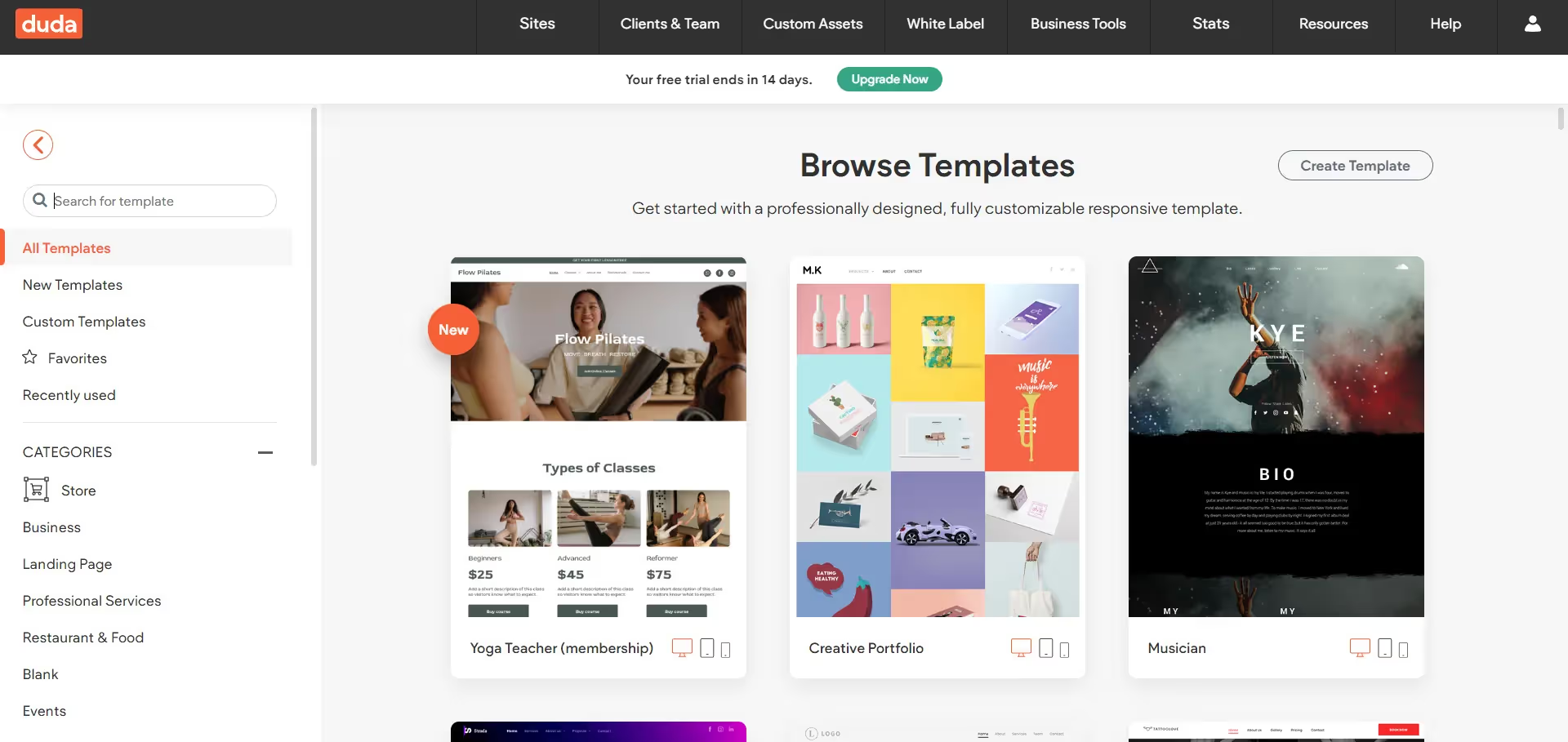
(Interface of Duda for choosing template suited to your needs)
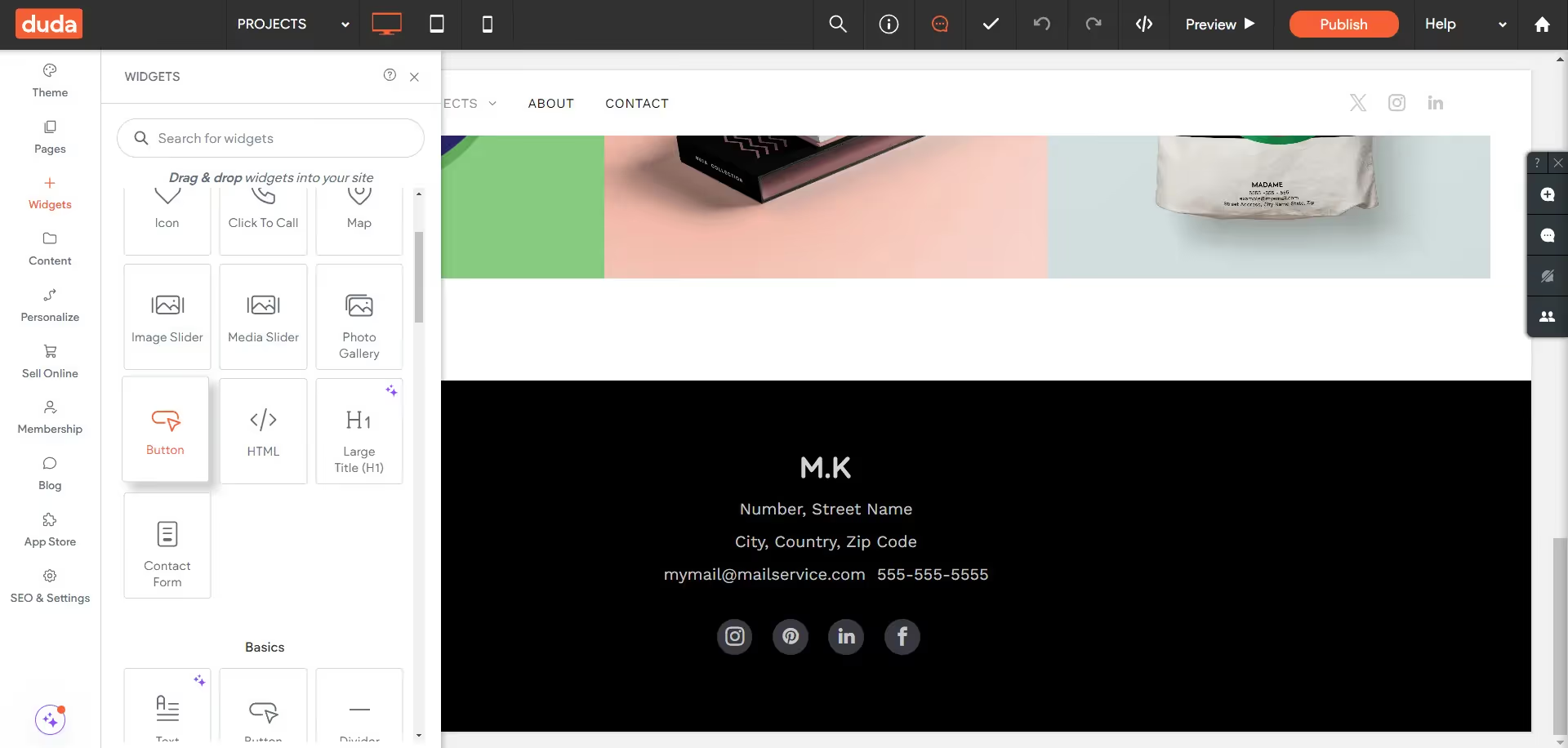
(Design Tools in Duda)

Use Cases of Duda: Who should use Duda?

Duda is best suited for design agencies and freelancers who require a robust solution for rapidly deploying multiple websites with varied templates while maintaining brand consistency across projects.

Duda serves a variety of use cases across different industries and user profiles.  Let’s see how Duda fits:

  • Small Businesses: Duda provides an accessible platform for small businesses looking to establish an online presence. Whether it's a local restaurant, boutique shop, or professional service provider, Duda offers customizable templates and easy-to-use tools to create a professional-looking website quickly.
  • Design Agencies: Design agencies can leverage Duda to streamline their website design process. With its white-label capabilities, agencies can create and manage multiple client websites from a single dashboard, offering a cohesive branding experience for their clients.
  • Freelancers: Freelancers in web design and development can use Duda to create and showcase their portfolio. With its drag-and-drop interface and customizable templates, freelancers can quickly build and publish professional websites for themselves and their clients.
  • E-commerce: Duda's e-commerce features make it suitable for businesses looking to sell products online. From product catalog management to secure payment processing, Duda provides the essential tools for setting up and managing an online store.

Duda's Drawbacks: When it's Time to Move On

While Duda offers many benefits, it also has some limitations that users should consider:

  • Limited Customization: While Duda provides customizable templates, the degree of customization may be limited compared to more advanced website building platforms. If you have specific design dreams in mind, Duda's templates might feel a bit restrictive.
  • Scalability Concerns: While Duda is suitable for small to medium-sized businesses, it may not be the best option for large enterprises or websites with complex functionality. As a website grows in size and traffic, users may encounter limitations in scalability and performance.
  • CMS Limitations:  Duda's CMS (Content Management System) have limitations compared to more robust CMS platforms. Users may find it challenging to implement complex content structures or customize content layouts beyond predefined templates.

About Webflow

Webflow bridges the gap between design and development. It allows you to build responsive websites visually, with the ability to manipulate HTML5, CSS3, and JavaScript directly through the interface.  Webflow is a more advanced web design tool that merges visual design functionalities with CMS features and high-level site customization.

Comparison Between Duda and Webflow

While both Duda and Webflow offer features for creating responsive websites with a visual editor, but they cater to different user needs and project scopes. Here's a comparison between the two platforms:

Ease of Use:

  • Duda is particularly designed to be user-friendly with a drag-and-drop interface that simplifies the web design process. This makes it accessible for users at all technical levels, from beginners to professionals.
  • Webflow, while also utilizing a visual editing approach, gears itself more towards professional designers and developers by offering advanced design controls and customization options. This provides a greater degree of creative freedom and technical finesse but comes with a steeper learning curve.

Features and Flexibility:

  • Duda is designed for efficiency and simplicity, offering all the essential tools needed for straightforward website projects. This includes mobile optimization, basic e-commerce features, and a variety of widgets. Its focus is on providing a seamless and quick setup, which is particularly beneficial for small businesses and freelancers looking to launch simple sites with minimal hassle.
  • Webflow excels in its breadth of features and deep flexibility, appealing to users who require detailed control over their site’s design and functionality. It supports complex interactions, advanced animations to handle high-level design requirements.

E-commerce Capabilities:

  • Duda offers functional e-commerce solutions tailored for small to medium-sized businesses. Its tools are straightforward, supporting basic store setups with options for product management, payment processing, and easy customization of storefronts to match the brand's aesthetic.
  • Webflow provides more advanced e-commerce tools that support a wider range of functionalities, including complex product configurations, integrated payment solutions, and customizability down to the checkout experience. This makes it well-suited for businesses that need a more tailored e-commerce experience or have specific requirements for their online stores**.**

Content Management System (CMS):

  • Duda is great for quickly setting up simple websites and blogs. It's user-friendly and helps you get a site running fast, which is perfect for smaller projects. However, if your website is growing or you're planning to add more complex features, you might find Duda a bit limiting. This is because Duda isn't designed for scalable websites that need detailed connections between different types of content or have lots of custom requirements.
  • Webflow offers a highly customizable CMS that allows you to tailor almost every aspect of your site.  You can create relational connections between different collection lists, which is a powerful feature for managing and displaying interconnected content on your website. This capability is part of what makes Webflow's CMS particularly robust and flexible, especially for complex projects.

Why Migrate from Duda to Webflow

Migrating from Duda to Webflow can offer several benefits for users looking to enhance their website's design, functionality, and scalability. Here are key reasons for considering migrating from Duda to Webflow:

  1. Enhanced Customization and Control: Webflow offers greater flexibility and control over website design and functionality compared to Duda. With Webflow, users can create highly customized websites with advanced animations, interactions, and dynamic content.
  2. Scalability and Performance: Webflow is built to scale, handling everything from high-traffic blogs to full-fledged e-commerce sites effectively. As a website grows in size and traffic, Webflow can accommodate increased demand without sacrificing performance.
  3. Advanced E-commerce Capabilities: Webflow provides more robust e-commerce features compared to Duda, making it suitable for businesses looking to create sophisticated online stores with extensive customization options.
  4. Advanced CMS:  Webflow's Content Management System (CMS) offers advanced capabilities that extend beyond those of Duda, particularly in handling complex data structures and relational connections. This feature allows users to create relationships between different types of content, such as linking authors to articles, products to categories, or portfolio pieces to client testimonials.
  5. SEO Flexibility: While Duda provides essential SEO tools that ensure sites are mobile-friendly and quick to load, it offers less flexibility and control over the technical SEO settings compared to Webflow. This might limit more advanced SEO strategies, such as detailed schema implementation or fine-tuning of link attributes.

The decision to migrate from Duda to Webflow often stems from a need for enhanced design flexibility and control over website functionalities. Webflow's superior capabilities in handling animations, interactions, and responsive settings allow designers to create more dynamic and engaging websites. Additionally, Webflow's robust community and extensive documentation provide invaluable resources for advanced design techniques.

Common Challenges with Duda to Webflow Migration

Migrating from Duda to Webflow may present some challenges, primarily due to differences in platform architecture, design paradigms, and feature sets. These challenges can impact various aspects of the migration process and require careful consideration and planning to overcome effectively. Migrating from Duda to Webflow can present several challenges:

  • Design and Layout Re-creation: Recreating the exact design and layout in Webflow that was initially created in Duda can be challenging due to differences in design tools and features. Users may need to adapt their design to fit Webflow's capabilities.
  • Content Transfer: Manual transfer of content (text, images, videos) from Duda to Webflow can be time-consuming and prone to errors. Users should carefully review and verify all content to ensure accuracy during the migration process.
  • SEO Settings Migration: Maintaining SEO rankings when switching platforms is a major concern. Users should pay close attention to SEO configurations (meta tags, headings, alt text for images) and ensure they are accurately transferred to Webflow to preserve search engine visibility.
  • Learning Curve and Familiarity with New Tools: There is a learning curve associated with mastering Webflow's advanced features, especially for users accustomed to the simplicity of Duda. Users may need to invest time in learning Webflow's interface and capabilities to fully leverage its potential.

How to Migrate from Duda to Webflow

Unlike some automated migration processes, moving from Duda to Webflow requires rebuilding your website's design from scratch. However, this presents an excellent opportunity to not only replicate your site but to enhance it. Webflow's unique design capabilities offer endless possibilities for creativity and innovation.

  1. Preparation: Begin by conducting a comprehensive audit of your existing Duda website. Assess every aspect, including content, design elements, functionality, and CMS structure. Take note of what works well and identify areas for improvement or enhancement in the migration process.
  2. Design Reconstruction: Leverage Webflow's robust design tools to meticulously recreate the layout and visual aesthetics of your Duda site. While maintaining the essence of your current design, seize the opportunity to explore and incorporate Webflow's advanced features to elevate the overall look and feel of your website.
  3. Content Migration: Initiate the manual transfer of content from Duda to Webflow, ensuring accuracy and consistency at every step. Consider employing scripts or tools for batch transfers to streamline the migration process where applicable.
  4. CMS Migration: If your Duda site utilizes a content management system, carefully plan and execute its migration to Webflow's CMS. This involves recreating data structures, custom post types, and content relationships within Webflow's CMS framework. Ensure that all content fields and structures are accurately replicated to facilitate seamless content management on the new platform.
  5. Functionality Setup: Implement any specific functionalities required for your website using Webflow's native tools or custom code solutions. Whether it's integrating forms, third-party services, or setting up e-commerce features, ensure that each functionality is seamlessly integrated and thoroughly tested to guarantee smooth operation on the new platform.
  6. SEO Adjustments: Transfer SEO settings from Duda to Webflow, including meta tags, headings, alt text for images, and other relevant elements. Verify that all SEO configurations are correctly transferred to maintain search engine visibility.
  7. Testing and Launch: Prior to launching your new Webflow site live, conduct rigorous testing across various devices and browsers. Evaluate its usability, responsiveness, and functionality to identify any issues or discrepancies that need addressing.

Conclusion

In conclusion, migrating from Duda to Webflow is a strategic move towards elevating your online presence and unlocking new possibilities for your website. With careful planning and the support of Webflow experts, you can navigate the migration process seamlessly and unlock the full potential of your digital presence.

READ BLOG
arrow
Mobirise to Webflow Migration

Mobirise to Webflow Website Migration

Want an expert for your Mobirise to Webflow website migration you have came to right place, let's us help you get a scalable website for your enterprise.

By 
Rajashri Brahma
5 min read

We've all been there. You need a website, but the world of coding seems like a foreign language. That's where website builders like Mobirise come in. It's a fantastic tool for beginners, allowing you to drag-and-drop your way to a beautiful website. But what if your website needs to evolve? What if you crave more design freedom and powerful features? That's when it's time to consider a platform like Webflow.

Mobirise in a Nutshell

Think of Mobirise as your website building training wheels. Mobirise is a drag-and-drop offline website builder designed primarily for users with minimal to zero coding knowledge. It provides a desktop application for Windows and Mac which allows users to create and manage websites without an internet connection.

It is a great choice for anyone who needs a website up and running quickly. It's perfect for freelancers, small businesses, or anyone who wants a simple portfolio site. With its user-friendly interface and pre-designed templates, you can create a decent-looking website without any coding knowledge.
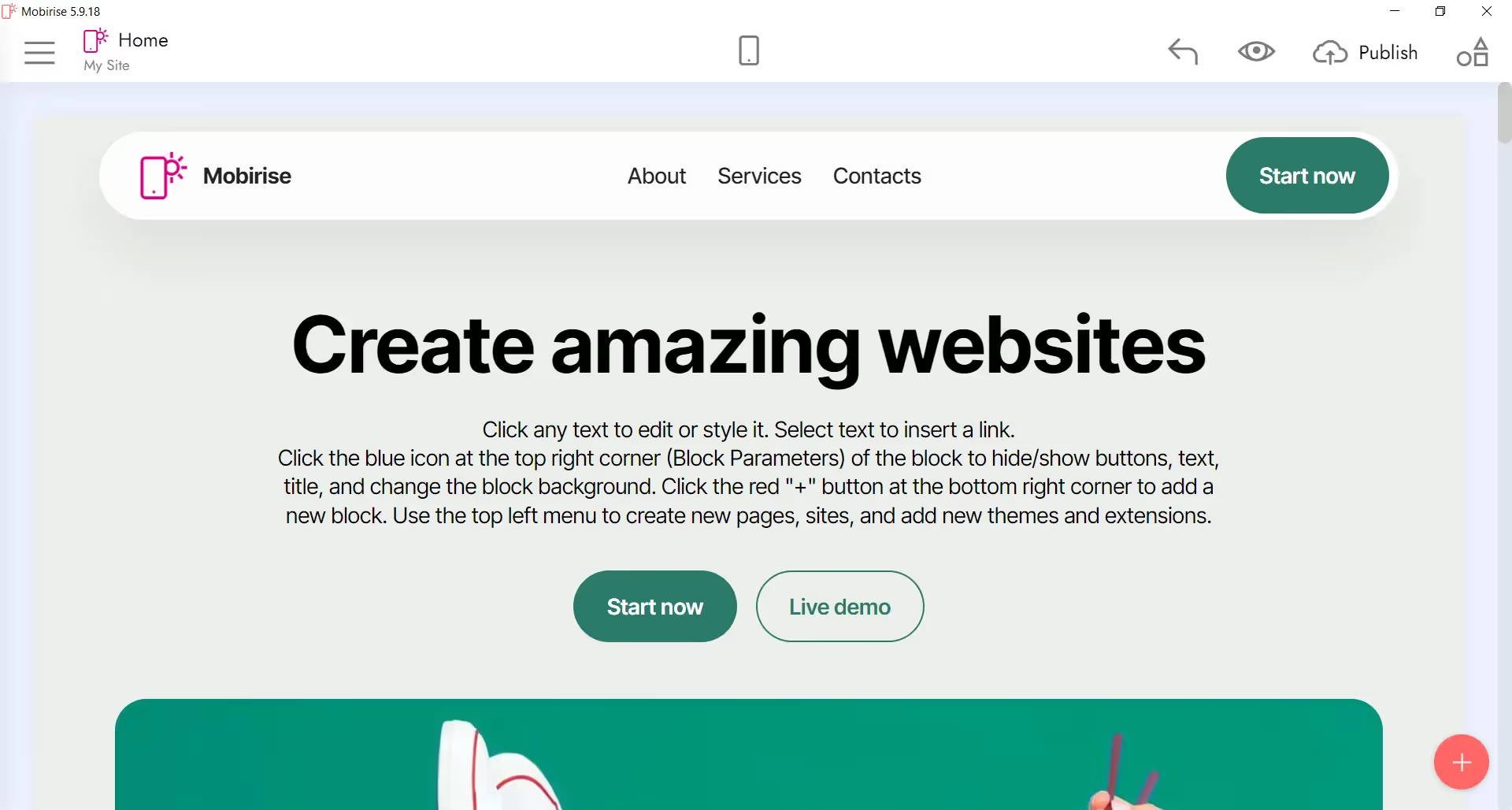
(User is first greeted with a default template of a website)
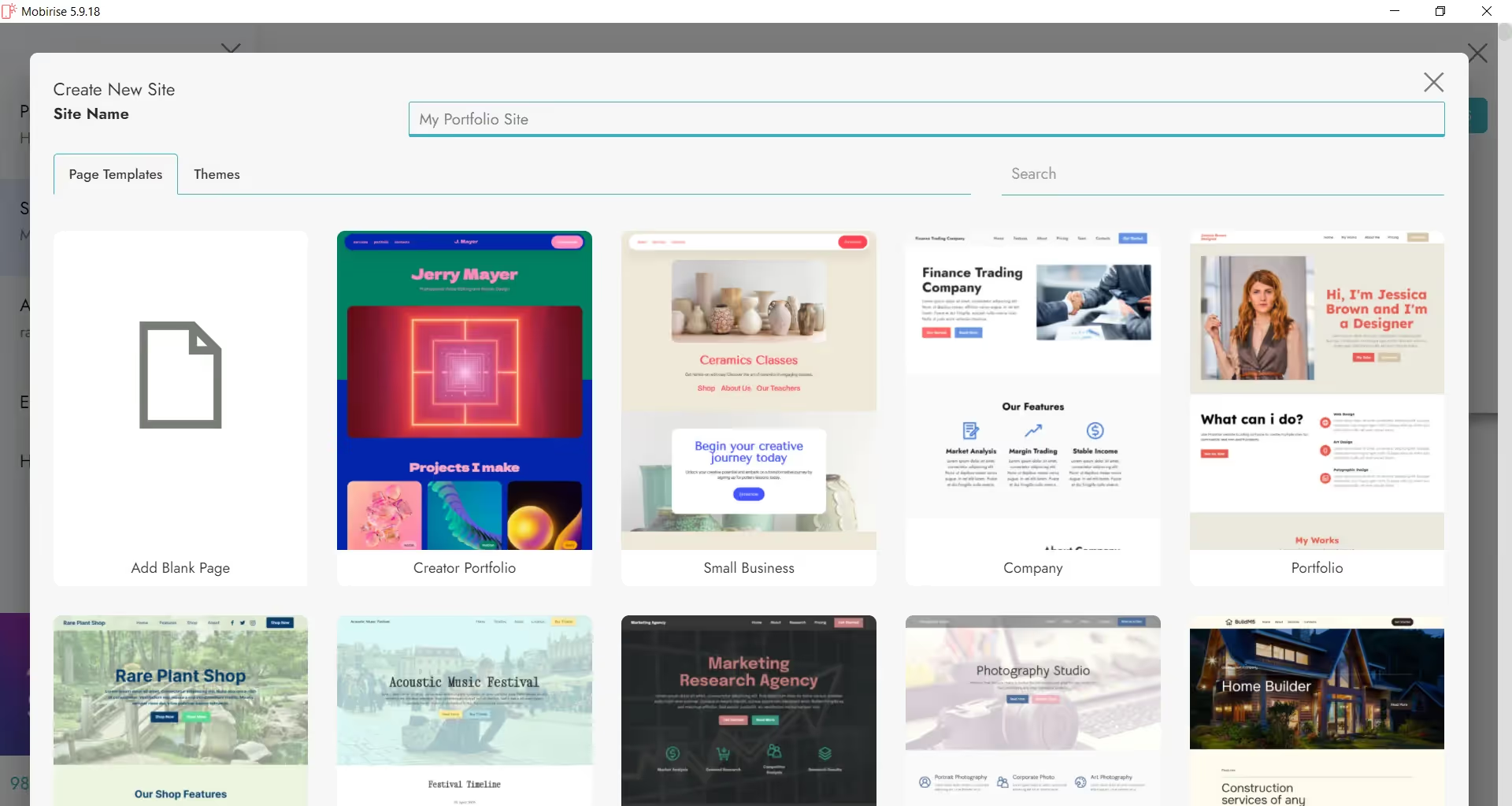
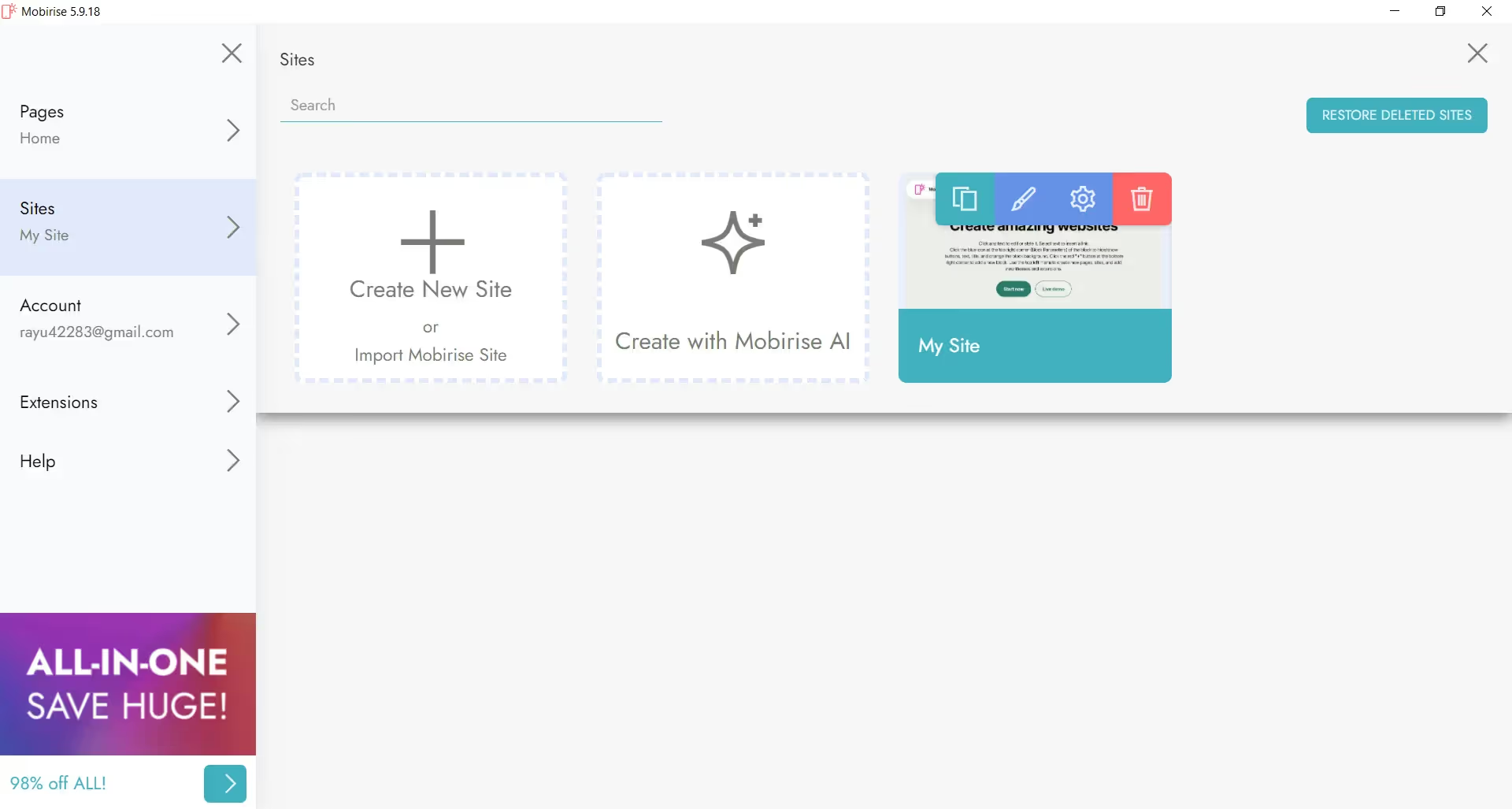
(Interface for creating new sites)
(Choose a template website suited for your needs)

Use Cases of Mobirise: Who Should Stick with Mobirise?

Users who prefer visual development without delving into the complexities of coding often find Mobirise an excellent choice due to its straightforward, block-based approach to website building.

Here are some use cases of Mobirise:

  • Freelancers: Ideal for individuals offering services like writing, design, and consultancy who need a simple platform to showcase their work without requiring deep technical skills.
  • Non-Tech Savvy Individuals: Suitable for users who prefer a straightforward, intuitive interface for creating personal or hobby websites without learning to code.
  • Small Businesses: Effective for small enterprises that need an immediate web presence with minimal investment in time and resources. Particularly useful for businesses like cafes, local shops, and small service providers.
  • Event Promotion: Perfect for creating landing pages for events such as workshops, conferences, or weddings, where ease of use and speed are more critical than complex functionality.
  • Portfolio Sites: Excellent for artists, photographers, and creatives who want to quickly set up visually appealing portfolio sites to display their work.
  • Educational Projects: Useful for students or educators who need to create project websites or educational portfolios without the complexities of advanced web development tools.

Disadvantages of Mobirise : When the Training Wheels Come Off

Despite being a fantastic website builder for beginners, like any tool, it has its limitations. Here's where Mobirise might not be the best fit for your website needs:

  • Offline Only Blues: Mobirise is a desktop application, meaning you can only edit your website on the computer where it's installed. No editing on the go or collaborating with others easily.Also, users must manually download and install updates which can lead to scenarios where a user may be unaware of new features or important security updates, potentially leaving their site vulnerable to new threats.
  • No CMS Functionality: Mobirise doesn't have a built-in content management system (CMS). This can be a nightmare if you have a website with a lot of content that needs frequent updates, like a blog.  Think about it –  without a CMS, adding new blog posts would be like manually rewriting an entire encyclopedia every time there's a new discovery!
  • Limited Design Customization: While Mobirise's drag-and-drop makes building a website easy, it can feel restricting when it comes to truly customizing the design.  Imagine wanting to give your website a unique flair but being stuck with the same furniture (design elements) everyone else has.  For some serious design tweaks, you might need to get down and dirty with code, which isn't ideal for beginners.
  • Scalability Issues: As your business grows and your website gets more traffic or content, Mobirise might start to struggle.  An online store built with Mobirise could experience slowdowns as the product inventory grows, kind of like your computer lagging when you have too many browser tabs open!

Enter Webflow: The Design Powerhouse

Webflow bridges the gap between website builders and professional coding. It offers a visual interface that's surprisingly intuitive, yet unlocks a whole new level of design flexibility. It's like the Swiss Army knife of website creation!

Designed for a broad audience, including designers, developers, and businesses, Webflow offers a powerful and flexible environment for creating, collaborating, and publishing websites. It lets you design beautiful websites visually, like dragging and dropping building blocks, and also gives you the power to fine-tune everything with code if you want.

Mobirise vs Webflow: A Showdown

While both Mobirise and Webflow cater to users who favor visual development environments, their capabilities differ significantly. And when deciding between Mobirise and Webflow, it's important to understand how each platform serves different user needs and project scopes. Here's a comparison:

Learning Curve:

  • Mobirise: Very user-friendly with a straightforward drag-and-drop interface, designed for users who have little to no coding knowledge. It's great for quick, simple website projects.
  • Webflow: Also features a visual interface but includes more advanced options and customization features. There is a steeper learning curve, but it's still accessible for designers who are not expert coders.

Features and Flexibility:

  • Mobirise: Offers basic features suited for small, static websites. While it has various pre-designed blocks, the options for deep customization are limited.
  • Webflow: Provides a comprehensive set of design tools and features, including animations, interactions, and a powerful CMS. It supports more complex, dynamic websites and gives users full control over HTML, CSS, and JavaScript.

For E-commerce:

  • Mobirise: Can handle a small online store, but not ideal for anything too big. Imagine a lemonade stand – perfect for selling a few refreshing drinks, but not a whole supermarket!
  • Webflow: Supports a more robust e-commerce setup with detailed product descriptions, secure payments, and a smooth shopping experience for your customers – it's like having a fully stocked online mall!

Multi-user Collaboration:

  • Mobirise: Not supported. Mobirise is an offline tool primarily designed for single users. Any collaboration would require manual coordination and file sharing, which can be cumbersome and inefficient.
  • Webflow: Strongly supported. Webflow allows multiple people to work on one website at the same time. It includes built-in team management features, real-time editing, and role assignments, which facilitate efficient and effective collaboration.

Why Move from Mobirise to Webflow?

Mobirise is a fantastic website builder, especially for beginners. But what if you're ready to take your website to the next level?  This is where Webflow comes in, like a website-building superpower booster! Here are some reasons for considering migrating from Mobirise to Webflow:

Enhanced Customization and Control:

  • Mobirise offers limited customization tied to predefined blocks and templates which is not ideal if you crave a unique website that reflects your brand perfectly.
  • Webflow  provides extensive customization options – animations, interactions, the whole website. It's like having a giant toolbox of design features to build exactly what you envision.

Content Management Made Easy:

  • Mobirise lacks a built-in CMS, making it difficult to manage content-heavy sites efficiently while
  • Webflow features a robust CMS that lets you design and populate content dynamically. Think a real estate agency – they can easily add new property listings without needing to rebuild the entire website each time. Webflow's CMS makes managing content a breeze.

Built for Growth:

  • Mobirise is great for small websites, but as your business grows, so do your website needs. Mobirise might struggle to keep up with a high-traffic website.
  • Webflow on the other hand is built to scale! Whether you're running a busy blog or a full-fledged online store, Webflow can handle it all.

Real-Time Collaboration and Access:

  • Mobirise, as an offline editor, it does not support real-time collaboration, limiting team productivity.
  • Webflow: can make your whole team work on the website together. Designers, content creators, and SEO specialists can all make updates simultaneously, saving you tons of time.

Continual Updates and Community Support:

  • Mobirise, being offline, updates require manual downloads, and the user community is smaller.
  • Webflow offers continuous updates, a massive community of users, and tons of helpful documentation.

Challenges to Consider: It's Not All Smooth Sailing

Mobirise does not have an export feature that aligns with Webflow’s import capabilities, which necessitates manual content migration. There's a lot to think about, and it might not always be smooth sailing.

Let's talk challenges:

  • Design and Layout Re-creation: Mobirise uses pre-built blocks, while Webflow lets you design with more freedom. Recreating the exact design and layout in Webflow that was initially created in Mobirise can be difficult and lead to discrepancies in translating designs directly.
  • Content Transfer: There's no magic content-moving app between Mobirise and Webflow. You'll need to manually transfer all your text, images, and videos , which can be time-consuming and prone to errors. So, you’ll have to ensuring that all content is transferred correctly without any errors.
  • SEO Settings Migration: Search Engine Optimization (SEO) helps people find your website online. Switching platforms can sometimes affect your SEO ranking. You might need to re-enter some SEO settings (meta tags, headings, alt text for images) in Webflow.
  • Learning Curve and Familiarity with New Tools: Mobirise is pretty straightforward. Webflow offers more power, but that also means there's more to learn – like figuring out all the features, which can be sometimes overwhelming for beginners.

How to Migrate from Mobirise to Webflow: Packing Your Website for an Upgrade!

Deciding to move your website from Mobirise to Webflow is like upgrading your apartment to a mansion – exciting, but there's some packing and planning involved. Here's a roadmap to help you migrate your website smoothly:

Step 1: Take Inventory

Before you start boxing things up (or in this case, migrating content), take a good look at your current Mobirise website. Make a list of all the content (text, images, videos) and any special features you have (forms, integrations, etc.). This will be your moving checklist!

Step 2: Design Reconstruction

Use Webflow’s design tools to recreate the layout and style of your Mobirise site, or even take this opportunity to completely revamp your website's look and feel.

Step 3: Content Migration

Since there’s no magic portal to transfer content between Mobirise and Webflow, you'll need to manually move all your text, images, and videos over. Scripting tools might be helpful for large amounts of content, but make sure everything gets packed safely!

Step 4: Functionality Setup

Webflow has tons of built-in features for things like forms and integrations. This is where you set up any special functionalities your website needs. If needed, you can also use custom code for even more customization.

Step 5: SEO Adjustments:

Switching platforms can sometimes affect your SEO ranking. To avoid getting lost in the move, you might need to update some SEO settings in Webflow. Ensure that all URLs are correctly redirected to maintain search engine visibility.

Step 6: Testing and Launch:

Make sure everything works perfectly.  Test your new Webflow site thoroughly – is it easy to navigate? Does it look good on all devices? Once you're confident, it's time to launch!

Conclusion

It might take a little effort to move in (the migration process), but the design freedom, and room to grow (scalability) are totally worth it! With Webflow, you're not just building a website, you're investing in a platform that can adapt and evolve alongside your business.

READ BLOG
arrow

Questions we answer often

Why use Webflow?

It empowers designers, developers, marketers, and entrepreneurs to ship ideas easily and quickly. It reduces development time and costs. It offers robust hosting and intuitive CMS. These are one of the many reasons to use Webflow. Head over to our blog on Why use Webflow to learn more.

Is Webflow better than platforms like Wix or WordPress?

Webflow excels for custom Webflow designs, fast-loading websites, and full control over every site element. It's the top choice for designers and developers seeking maximum creative freedom.

How does Webflow work?

You don't need to write tedious lines of code. Only drag-and-drop elements on the canvas, and you have the code ready by the no-code builder. Additionally, you can host your web apps within Webflow as well.

What is Webflow used for?

Webflow can be used to create any web applications, including websites, e-commerce stores, portfolios, CMS, etc.

Is Webflow better than Wix?

Yes, in many ways. Webflow helps create immersive and interactive websites without writing complex code. Webflow offers a straightforward way to create front-end and back-end without expensive hosting plans, long dev time, and limited template options. Webflow offers greater control over the look and feels of your website than Wix.

Why is Webflow better than WordPress?

We favor Webflow over WordPress. Webflow saves time and effort. The CMS and e-commerce of Webflow were designed with modern trends in mind. The CMS has in-built SEO capabilities, unlike WordPress. Additionally, even the e-commerce solution from Webflow is fairly scalable, something that's difficult with WordPress. Webflow offers a potent way for businesses and designers to manage their websites without the aid of developers.

How do I manage domain and hosting after the migration?

Webflow's built-in hosting delivers global CDN performance for fast load times and high uptime. Connect custom domains effortlessly via the Hosting tab—no technical expertise needed.

Do I need coding knowledge to migrate to Webflow?

Webflow empowers designers to create responsive, visually stunning sites using its intuitive visual editor and pre-built components. No coding is required for most projects, making it ideal for rapid prototyping and client deliverables.

What happens to my current website’s SEO after migrating?

Set up 301 redirects for all key URLs to pass link equity. Optimize Webflow's built-in SEO settings like meta tags and alt text. Submit your updated sitemap to Google Search Console for faster reindexing.

Can I import my existing blog posts to Webflow?

Yes, Webflow's CMS makes it easy to import blog posts. Simply convert your blog data to a CSV file and upload it directly to your CMS collections for quick migration and bulk content setup.

How do I export content from my current platform (Wix, WordPress, etc.)?

Platforms like WordPress offer simple content export via XML files. This built-in tool lets you quickly back up posts, pages, and media for seamless migrations.

Does Webflow support third-party integrations?

Yes, Webflow supports plenty of integrations. You can either connect them natively using Webflow Logic. Or you can use automation tools like Zapier to integrate third-party apps if your project calls for a third-party stack.
Migration related questions?

Get them answered.